Salesforce Data 360 MCP Server Is in Developer Preview
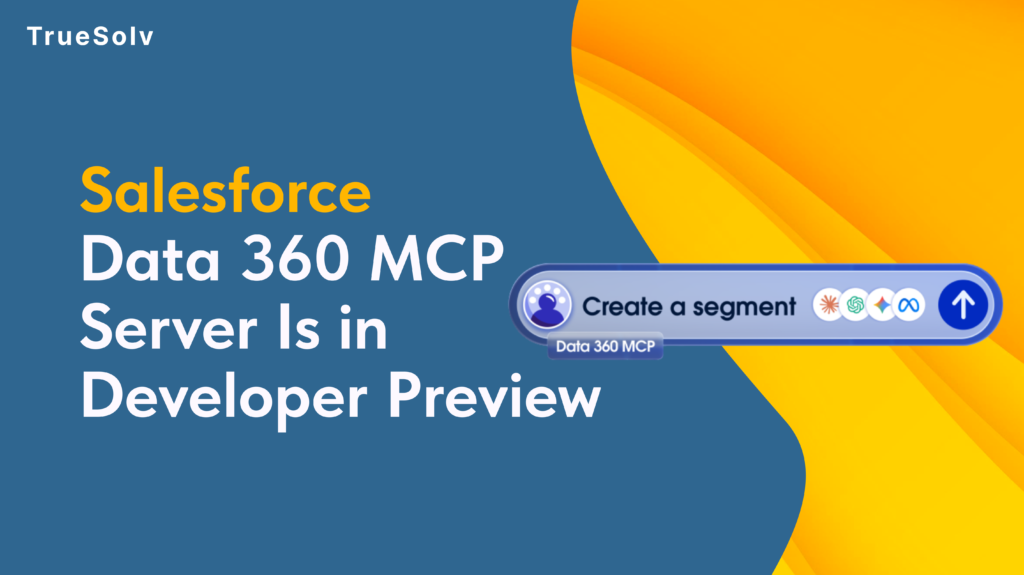
On May 26, Salesforce announced that the Data 360 MCP Server is now in Developer Preview. The idea is direct: every piece of data in your Salesforce Data Cloud is now reachable by any AI agent that speaks Model Context Protocol. Your CRM context, unified customer profiles, real-time data streams — accessible from Claude Code, Cursor, or any MCP-compatible agent tool without writing a custom API wrapper. Data 360 MCP Server — How Data Cloud Connects to AI Agents Salesforce Data Cloud • Unified customer profiles • Audience segments • Calculated insights • Data streams • Identity resolution exposes Data 360 MCP Server Developer Preview Trust Layer protected tool calls MCP-compatible AI agents Claude Code Cursor / Codex Agentforce Studio Custom MCP clients Any agent that speaks MCP No custom API wrapper required. Data arrives through the same trust layer as other Agentforce data access. What the Data 360 MCP Server actually exposes The server gives AI agents structured access to Data Cloud data — unified customer profiles, audience segments, data streams, calculated insights, and identity resolution outputs. These are the data objects that previously required SOQL-like queries against the Data Cloud query engine or custom API development to surface. Through the MCP interface, an agent can retrieve a unified customer profile by identity, query segment membership for a specific individual, pull calculated insight values for an account, or read real-time data stream events — using the same tool-call pattern it would use to interact with any other MCP server, without learning a proprietary API. The significance is in the combination. An agent building a renewal recommendation previously had access to Salesforce CRM data — the account record, the opportunity history, the activity log. What it did not have was the Data Cloud layer: the calculated health score from product usage, the segment membership that reflects behavioural patterns, the cross-channel identity resolution that unifies how the same customer appears across touchpoints. The Data 360 MCP Server adds that layer. Why this changes how agents reason The practical difference between an agent with CRM access and an agent with CRM plus Data Cloud access is the difference between structured records and contextualised customer intelligence. An agent reviewing a renewal opportunity can currently see: account name, ACV, contract end date, last activity log, open support tickets. With the Data 360 MCP Server, that same agent can also see: the customer’s health score calculated from product usage patterns, their segment membership indicating they are in a high-churn-risk cohort, and their identity resolution confirming that two separate records in the CRM are the same individual. Because the data arrives through the MCP interface with the same trust layer protections as other Agentforce data access, the agent’s data handling governance applies uniformly — no separate security configuration needed for the Data Cloud layer. What is available in Developer Preview vs. what is coming Capability Available in Developer Preview Expected at GA Unified customer profile retrieval ✓ Query by identity, return full profile with attributes — Audience segment membership ✓ Query segment membership for a specific individual or account — Calculated insights reads ✓ Return health scores, propensity scores per record — Identity resolution queries ✓ Cross-reference unified identity across touchpoints — Data stream reads ✓ Basic event stream data — subject to Data Cloud sync latency Real-time streaming subscriptions Write-back to Data Cloud ✗ Not yet available Agents will be able to update Data Cloud records based on reasoning output Complex data stream subscriptions ✗ Not yet available Subscribe to data stream events as part of agent trigger logic Production org access ✗ Developer Edition orgs with Data Cloud only Full production org access at GA Developer Preview gives access to the core unified profile retrieval, segment queries, and calculated insight reads. The key constraint is data freshness: Data Cloud data surfaces through the MCP Server with the same refresh latency as the underlying Data Cloud sync. For most use cases this is acceptable. For agents reasoning about real-time events, it is worth understanding the lag characteristics of your specific data streams before building workflows that depend on sub-second freshness. Developer Preview access path Data 360 MCP Server — Developer Preview Access Path4 steps 1Confirm your org has Data Cloud enabledDeveloper Edition orgs with Data Cloud access qualify for Developer Preview. If you do not have a Data Cloud-enabled org, spin up a Developer Edition at developer.salesforce.com — the fastest path to experimenting. 2Enable the Data 360 MCP Server in SetupOpen Setup → search for MCP Servers. The Data 360 MCP Server appears in the available server list for Developer Preview-enrolled orgs. Enable it and configure which agents have access to which data objects.Setup → MCP Servers → Data 360 MCP Server → Enable 3Connect an MCP-compatible clientClaude Code, Cursor, Agentforce Studio, or any MCP-compatible development environment can connect once the server is enabled. The server returns a tool manifest — no custom authentication code required beyond the standard MCP handshake. 4Test with a unified profile retrievalPull a known profile by ID, confirm the MCP Server returns the same data as the Data Cloud UI, and verify that segment membership and calculated insights are included in the response. This confirms the data path is working before building agent logic on top of it. Developer Preview is the right time to experiment, not the right time to build production workflows. Map your architecture, test your data access patterns, and identify what works before GA removes the preview caveats. The orgs that move through this now will deploy faster when GA lands. Data 360MCPData CloudSalesforce DevAgentforce Share: LinkedIn Twitter / X Copy link In this article 01What it exposes 02Why it changes agent reasoning 03Preview vs. GA capabilities 04Access path — 4 steps Developer Preview status Unified profilesQuery by identity — live Segment membershipPer individual — live Calculated insightsHealth scores — live Write-backExpected at GA Production orgsDev Edition only now Quick access path 1️⃣Enable Data Cloud in org 2️⃣Setup → MCP Servers → Enable 3️⃣Connect MCP
Zero Copy Data Strategy For Salesforce Leaders
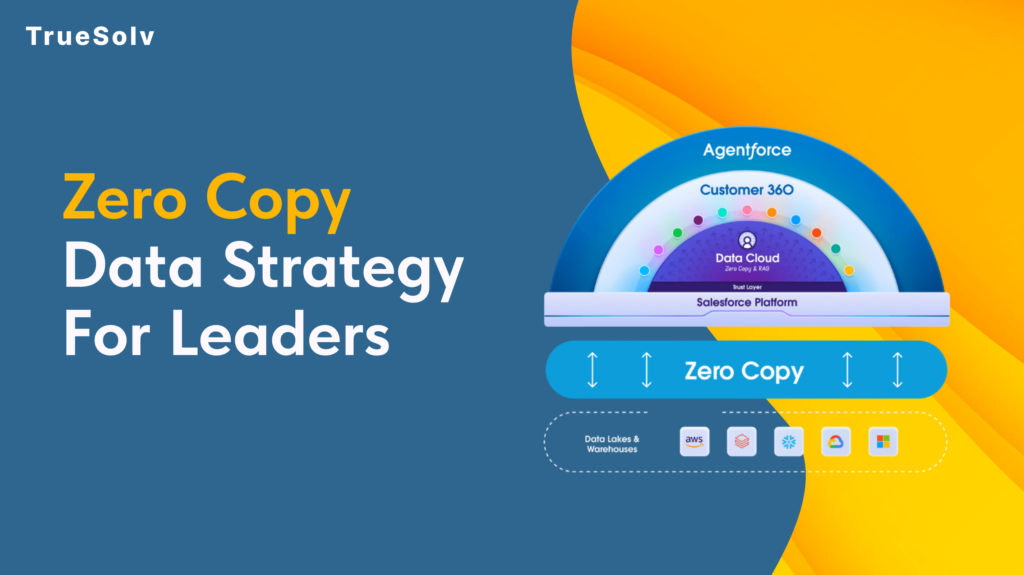
Your data pipeline costs are high because duplication is still the default Moving data feels like progress. Pipelines get built, jobs get scheduled, dashboards get populated. Then the bills arrive and the numbers on those dashboards are still two hours old. Zero Copy is Salesforce’s answer to that pattern. The concept is straightforward: query the data where it lives instead of copying it somewhere else first. The strategic implications for how organisations manage their data estate are considerably less straightforward, and that is what leaders need to understand before committing to a rollout. What Zero Copy changes for cost and speed Traditional data integration between a warehouse like Snowflake or BigQuery and a platform like Salesforce has followed the same basic model for years. Extract data from the source, transform it, load it into the destination, keep the sync job running, fix it when it breaks, reconcile the drift when numbers do not match. Every copy is a maintenance obligation. Zero Copy replaces that model with direct federation. Salesforce Data 360 connects to the external system and sends queries against the data where it already lives. The results come back without a copy of the underlying data ever moving to a new location. When the source data changes, the next query reflects that change immediately. The cost reduction argument operates on two levels. Storage costs drop because duplicate datasets are eliminated. Engineering costs drop because the sync pipelines, the error handling, the reconciliation processes, and the monitoring overhead that comes with them no longer need to exist. For organisations running multiple integration pipelines into Salesforce, that engineering overhead is more significant than the storage bill. On speed, the practical outcome depends heavily on where data physically sits relative to where the query runs. Data 360 uses advanced query pushdown, which delegates computation back to the originating warehouse rather than pulling raw data across and processing it in Salesforce. When the data and the compute are in the same cloud region, this is fast. When they are not, the cross-region transfer introduces the latency that Zero Copy was supposed to eliminate. Use cases that work well Zero Copy performs well in specific scenarios and those scenarios share common characteristics. Operational reporting where freshness matters. If a revenue dashboard, a service queue metric, or an account health score needs to reflect what happened in the last fifteen minutes rather than the last sync cycle, federating from the warehouse eliminates the lag. The data is always current because it is never a copy. Large reference datasets that would be expensive to replicate. Product catalogues, entitlement records, historical transaction data, enrichment datasets from third-party providers. These are large, they change infrequently at the record level, and they are expensive to maintain as copies. Federating them into Data 360 for use in segmentation and identity resolution keeps the warehouse as the source of truth without duplicating the storage cost. AI and agent workloads requiring real-time context. Agentforce and Einstein features fed by stale copied data produce outputs that reflect the past rather than the present. Zero Copy allows AI features to operate against live warehouse data, which meaningfully changes the quality of the output in time-sensitive interactions such as service escalations or dynamic pricing decisions. Bidirectional insight sharing. Zero Copy is not only inbound. Data 360 can share unified customer profiles, segmentation outputs, and AI-generated insights back to the warehouse without replication. Teams that need Salesforce-derived insights in their BI tools or data science environments get those outputs written back to Snowflake or BigQuery without another pipeline layer. Security and access implications Zero Copy changes the security model in ways that require deliberate attention before deployment. With traditional ingestion, access control is applied when data arrives in Salesforce. The ingested dataset can be governed independently of the source. With Zero Copy, access control lives at the source. The permissions set in Snowflake, BigQuery, or the relevant warehouse determine what Salesforce can see. If those permissions are broad, the federation inherits that breadth. The implication for leaders is that permission mapping needs to happen before Zero Copy goes live, not after. Which tables and views is Data 360 authorised to query. Which fields within those tables. Which profiles or roles within Salesforce can access the federated data once it appears in the platform. These questions have answers that sit across two systems, and the governance model needs to account for both. PII handling deserves specific attention. One of the stated benefits of Zero Copy is that personally identifiable information stays in its original governed environment rather than being duplicated into a new location. That is accurate, but it does not reduce the compliance obligation. If GDPR, HIPAA, or any other regulatory framework applies to the data in the warehouse, federating it into Salesforce does not change what those obligations require. Compliance teams should be part of the Zero Copy governance conversation from the beginning. Salesforce provides Private Connect for Data 360, which allows federating from warehouse environments locked within a private cloud network. For organisations with strict network isolation requirements, this is the relevant configuration to understand before assuming Zero Copy requires exposing source systems to the public internet. Implementation checklist and governance Before a Zero Copy rollout, the following decisions should be made explicitly rather than discovered during deployment. Identify the use cases. List the specific reporting, segmentation, or AI scenarios that will use federated data and confirm that Zero Copy fits each one based on the criteria above. Audit the source data. Assess data quality, field naming conventions, and data type handling in the warehouse before connecting it to Data 360. Quality problems in the source appear directly in the federation. Map permissions before connecting. Define exactly which tables, views, and fields Data 360 is authorised to access. Do not default to broad warehouse permissions because the connection is easier to configure that way. Confirm cloud region alignment. Verify that Data 360 infrastructure and the warehouse are in the same cloud region. Cross-region
Data 360 Lineage For Trusted Numbers
Two reports. Two very differentnumbers. One very uncomfortable meeting. That scenario plays out in revenue reviews, board updates, and pipeline calls more often than most teams admit. When it does, the instinct is to find the right number. The better instinct is to find out why two different numbers existed in the first place. What lineage actually solves in executive reporting The word lineage sounds technical (and maybe a bit historical), but the problems it solves are completely opposite of it. When a metric is wrong, or when two teams are working from different versions of the same metric, the question that matters is not which number is correct. It is: where did this number come from, what touched it along the way, and when did it last change. Lineage answers that question. It creates a traceable record from source data through transformations to the final figure that appears in a report or dashboard. Without it, root-cause analysis turns into a conversation where everyone points at a different system and nobody can prove anything. For decision makers, lineage is the difference between a reporting dispute that takes three days to resolve and one that takes three hours. How to operationalize lineage in governance Lineage by itself is a record. The practical starting point is mapping critical KPIs to their upstream sources. Not every metric needs deep lineage documentation. The ones that drive decisions, that appear in board reporting, that tie to revenue targets or customer commitments, those need a clear owner, a known source, and a documented transformation path. Once that map exists, the next step is defining what triggers a review. A source schema change. A calculation update. A new data connector going live. These are the moments when lineage documentation needs to be updated and when stakeholders need to know that a metric may have changed its meaning even if the number looks similar. Building this into standard change management processes is what separates teams that prevent reporting disputes from teams that spend Monday mornings resolving them. Who owns sources, transformations, and activation One of the more uncomfortable questions lineage surfaces is ownership. When data moves from a source system through a transformation layer and into a report or segment, each step should have a named owner. In practice, it often does not. Source data is owned by whoever manages the integration. Transformations were built by a developer who may no longer be on the team. The report is owned by whoever uses it most frequently, which is not the same as owning the data behind it. Data 360 supports explicit ownership assignment across sources, calculated insights, and activation targets. The governance value of that is not just administrative tidiness. It means that when a number changes unexpectedly, there is a clear escalation path. Someone is accountable for each layer. For RevOps and IT leaders, building that ownership map into onboarding for new data assets is a significantly more effective practice than reconstructing it after a reporting incident. Change control for analytics and segments Segments built in Data 360 can drive marketing journeys, sales prioritization, service routing, and AI agent behavior. When a segment definition changes, the downstream effects can be substantial. A change to an audience filter might quietly exclude a large group of high-value accounts from a nurture sequence. A modified calculation might shift how pipeline is categorised in forecasting. Change control for analytics assets follows the same logic as change control for code. Document what changed. Note who approved it. Record what the definition was before. Make it recoverable. Data 360 Unified Lineage gives this process its foundation by logging transformations and activation events. The approval workflow and the communication to stakeholders still requires a deliberate governance decision. Validation checks before activating new data A new data source going into production without validation checks is a common source of metric drift that nobody notices for weeks. The ingestion works. The records land. The numbers look plausible. But the field mapping is slightly off, the identity resolution rules do not account for a quality issue in the source, and slowly the unified profile becomes less accurate than the system it was meant to improve. Adding validation checkpoints before activating new data is not a significant overhead. It is a comparison of expected record counts, a check on field completeness, a review of identity resolution match rates before the new source is used in reporting or segmentation. Building this into the activation workflow rather than treating it as an optional QA step is what keeps lineage trustworthy over time. A lineage record that shows a clean path through a poorly validated source is not governance. It is a well-documented mistake. What decision makers should prioritize Reporting trust is a business problem with a governance solution. The technical capabilities to track, audit, and govern data from source to activation exist in the platform. What requires a leadership decision is the commitment to build ownership, change control, and validation into standard operating practice rather than treating them as documentation exercises that happen after something breaks. The organizations that do this well tend to share one common trait. They decide that a reporting dispute costs more than the governance process that prevents it, and they act on that before the dispute happens rather than after. Map critical KPIs to their upstream sources and assign a named owner to each layer Define what events trigger a lineage review and communicate changes to stakeholders proactively Add validation checks to the activation workflow so new data earns its place in reporting before it influences decisions Trust in data improves when data has a paper trail, and a paper trail only exists if someone decided it was worth building. TrueSolv can build a lineage-first reporting governance model for your Salesforce and Data 360 environment. Follow our newsletter for data and CRM operations topics. Contact us.