How to Use Agentforce to Automate SaaS Renewal Protection

Most SaaS companies do not lose renewals because the product failed. They lose them because nobody noticed the signals in time — usage dropping, a key contact going quiet, a support ticket that never fully resolved. By the time the CS team follows up, the customer has already decided. Agentforce inside Salesforce changes this from a reactive problem to a proactive workflow. Proactive CS motions outperform reactive ones at every stage The signal arrives weeks before the decision. The question is whether your system is watching for it. 67%Higher renewal rate when CS reaches out proactively vs. waiting for the customer to initiate 14 daysAverage time between detectable usage decline and churn — the intervention window most teams miss 80+Accounts per CS rep at a 30-person SaaS company — volume that makes manual monitoring impossible SaaS industry renewal benchmarks. Specific percentages vary by product category, deal size, and CS team structure. Part 1: Why SaaS renewal churn is a data problem, not a people problem The CS team at a 30-person SaaS company is usually one or two people managing 80 or more accounts. They are good at their jobs. They are not able to proactively review every account monthly while simultaneously handling onboarding calls, support escalations, and renewal negotiations. The signals that predict churn are not hidden. Usage declining by 40 percent over two weeks is visible in your product analytics. A key contact going silent for 45 days is visible in your activity log. A support ticket that stayed open for 12 days before resolution is visible in your case management. The problem is that nobody is watching all of these signals simultaneously across 80 accounts. Agentforce agents can. They run continuously against your Salesforce data, evaluate conditions against defined thresholds, and take action when those thresholds are crossed — without requiring a CS rep to remember to check. The data advantage compounds over time. As agents surface patterns — which usage drops correlate with churn, which onboarding milestones predict expansion — your renewal playbook becomes more precise with each cycle. Part 2: What an Agentforce renewal agent actually does An Agentforce renewal agent is an automated system that monitors account health signals, evaluates them against configured thresholds, and takes a defined action when a threshold is crossed — without human initiation. Agentforce Renewal Workflow — How a churn signal becomes a CS action Data Signals • Usage −40% / 14d • No contact 45+ days • Open support tickets • Contract 60d away Monitors Agentforce Renewal Agent Evaluates all signals simultaneously • 24/7 Triggers Autonomous Actions Priority CS task assigned to account owner Account summary usage + contacts + tickets Churn risk flag renewal dashboard alert Draft renewal email queued for CS review No human initiation required. Agent runs continuously against Salesforce data. The distinction from a standard Salesforce Flow is the reasoning layer. A Flow fires when a condition is met. An Agentforce renewal agent evaluates the condition in context — weighing multiple signals simultaneously, generating a natural language summary of what it found, and drafting context-aware communication that a Flow cannot produce. Part 3: Three renewal agent workflows worth building first Workflow 1 60-day renewal outreach agent Trigger:Contract end date is 60 days away. What it does:Reviews account health signals — product usage trend over the last 30 days, open support issues, last contact date, any logged expansion signals. Drafts a personalised renewal email with specific context from the account record. Queues the draft for CS review with a task to approve or revise within 48 hours. Why it works:A calendar reminder tells the rep to follow up. This agent tells the rep what the account looks like right now, drafts the message, and makes the rep’s job to review and send — not to research and write. The rep’s 20 minutes of prep becomes 5 minutes of review. Expected outcome: Higher quality renewal outreach, earlier in the cycle, with no additional CS capacity required. Workflow 2 Churn risk alert agent Trigger:Product usage drops more than 40 percent over a 14-day window compared to the prior 14 days. What it does:Flags the account with a Churn Risk tag in Salesforce. Creates a priority task for the account owner. Generates an account summary: last contact date, open support issues, usage trend, contract value and end date, any recent expansion or contraction signals. Why 14 days:The most actionable churn signals happen 30 to 60 days before renewal. A 14-day usage decline detected at 60 days out gives the CS team time to intervene before the customer has made a decision. Detected at 5 days out, the same signal is too late. Expected outcome: CS team prioritises the highest-risk accounts with full context before the intervention window closes. Workflow 3 Post-onboarding health agent Trigger:New subscription start date is 30 days ago. What it does:Checks whether the account has hit three key activation milestones. If all three are met, logs the health check and takes no further action. If one or more are not met, creates a targeted outreach task with a guided onboarding checklist attached and flags the account for a CS review. Why it matters:Customers who do not activate in the first 30 days are significantly more likely to churn at their first renewal. A health check at 30 days identifies at-risk customers at the moment where intervention — a 20-minute call, a targeted email with specific steps — is most likely to work. Expected outcome: Improved 30-day activation rates, lower first-renewal churn, CS effort focused on accounts that need it. Agent workflow Trigger What the agent does Expected outcome 📅 60-day renewal outreach Contract end date is 60 days away Reviews account health, drafts personalised renewal email, queues for CS review with 48-hour approval task Higher quality, earlier renewal outreach. Rep prep: 20 min → 5 min review. ⚠️ Churn risk alert Product usage drops 40%+ over 14-day window Flags account, creates priority task, generates account summary with full context CS prioritises at-risk accounts with
Stripe and Salesforce integration for SaaS companies
Your Stripe dashboard shows who is paying. Your Segment or PostHog shows who is actually using the product. Your Salesforce shows who the sales team is talking to. Three tools, three completely separate truths, and no connection between them. The most dangerous churn is the kind where a customer goes quiet in the product weeks before the renewal and nobody on the sales team knows, because they are looking at a different screen. At 30 to 50 people, this gap stops being an inconvenience and starts costing real revenue. How the Three Systems Connect in Salesforce Segment or PostHog PRODUCT EVENTS Stripe Billing & Subscriptions BILLING DATA Salesforce Account · Opportunity Contract · Lead · Contact SALESFORCE FLOW PQL events usage scores MRR · plan · status Renewal Opportunity auto-created at 90-day window PQL Task for Rep triggered by product threshold CS Churn Alert usage drop triggers CS queue Stripe and Segment/PostHog feed Salesforce. Flow automation handles the rest. How this gap forms at the 30–50 person stage At 10 people, three separate systems are manageable. The founder knows every customer. The CS lead knows the product numbers. The AE knows the renewal dates. Context lives in heads rather than systems, and that works until it does not. At 30 to 50 people, the team is too large for context to live in heads, and too small to have dedicated RevOps infrastructure. Stripe renewals are tracked in a shared spreadsheet that someone updates when they remember. Product usage reports are emailed by the data team on Fridays, if at all. Salesforce has the account records, but none of the product or billing reality is visible on them. The result is a sales team operating on incomplete information, a CS team reacting to churn rather than preventing it, and a leadership team whose pipeline numbers do not reflect what is actually happening in the customer base. Three problems that appear when these systems are not connected The renewal blind spot A subscription renewal is not a surprise event. The date is known. The contract value is known. And yet, in most SaaS companies at this stage, renewals are managed through a combination of calendar reminders, spreadsheet exports from Stripe, and a Salesforce pipeline that someone populated three months ago and has not touched since. The specific failure mode is not the missed renewal itself it is the missed signal. A customer whose usage dropped 60% in the 30 days before renewal is telling you something. Without Stripe and product data flowing into Salesforce, that signal is invisible. The rep goes into the renewal call having seen nothing change in CRM, not knowing the customer has already mentally moved on. Research from SaaS industry benchmarks consistently shows that companies managing renewals manually lose 10 to 15 percent more ARR to avoidable churn than those with connected systems. At a $3 million ARR base, that is between $300,000 and $450,000 a year in revenue that a spreadsheet is costing you. 10–15% more ARR lost The cost of managing renewals manually SaaS companies that track renewals in spreadsheets — without automated CRM visibility into billing and product usage — lose 10 to 15 percent more ARR to avoidable churn than those with connected systems. At a $3M ARR base, that is between $300K and $450K per year that a spreadsheet is costing you. SaaS industry renewal benchmarks The PQL opportunity going uncontacted The most valuable leads in a SaaS company are not the people who filled out a demo form. These are Product-Qualified Leads, and they are worth three to five times the conversion rate of a cold inbound lead. The problem is that the signal for a PQL lives in Segment or PostHog. It does not live in Salesforce. So when a user activates your most advanced features and invites four teammates in the same week, nothing happens in CRM. Meanwhile, the rep’s call list is full of people who clicked an ad or downloaded a whitepaper. The highest-intent users in your product are invisible. The quote and proposal bottleneck At this stage, sales reps are usually creating proposals in one of three ways: a Google Docs template they copy and paste from, a PDF that lives on someone’s desktop, or an email they wrote from scratch. None of these live in Salesforce. None of them can be tracked, approved by a manager, or analyzed for win rates. Furthermore, when a deal closes, nobody can trace back from the Opportunity to the quote that was sent. Pricing decisions, discount patterns, and approval workflows are invisible to leadership. The audit trail does not exist because the quotes were never in the system. What a sales rep’s week looks like without the integration vs. with it What the rep sees Without integration With integration Current MRR / plan ACV from when the deal was first entered. May not reflect a seat reduction or downgrade that happened in Stripe. Live MRR pulled from Stripe, updated on the Account record in real time. Seat count and plan visible at a glance. Product usage trend Not visible. Rep would need to ask the CS lead, who would need to pull a report from PostHog or Segment manually. 30-day engagement score and key feature activation events visible directly on the Account record. Renewal date In the spreadsheet maintained by one person. Or a calendar reminder. Possibly both, possibly disagreeing. Renewal Opportunity auto-created 90 days out, visible in pipeline alongside new business, with value from contract. Churn risk signal None — unless a customer raises a support ticket or emails to cancel. Risk is identified at or after the churn event. Usage drop flag auto-generated when engagement falls below baseline for 14+ days. CS task created before the call. Payment health Unknown. A declined card or failed payment from last month would not appear in CRM. Payment status from Stripe on the Account record. Failed payments surfaced as a risk flag before the renewal call. Expansion opportunity Rep guesses
Salesforce Setup Roadmap for SaaS Companies
Setting up Salesforce for a SaaS company is not the same as setting it up for a real estate agency or a professional services firm. Subscriptions, trials, renewals, MRR, none of that exists in a default Salesforce org. Getting it right means building a system that reflects how SaaS revenue actually works: from the first lead through to the second and third renewal. This is the setup roadmap used with SaaS companies at every growth stage. SaaS Salesforce Setup — Three-Phase Roadmap Phase 1 Pipeline Control 2 – 15 people SaaS-configured objects (MRR, ACV, trial stages) Website lead capture via Web-to-Lead Email and calendar auto-sync Basic quota tracking Clean data migration Foundation Phase 2 Process & Prevention 15 – 30 people Contract Management object New Business vs Renewal quota split Round Robin lead assignment Calendly integration Outbound activity logging Scale-Ready Phase 3 Revenue Intelligence 30 – 50 people Product data via Segment / PostHog Stripe subscription sync Automated Renewal Opportunities Quotes object and PDF proposals RevOps forecasting Fully Connected Build in sequence — each phase is the foundation for the next The roadmap breaks into three phases, each tied to the problems that appear at a specific team size. Phase 1 is about getting your data into one place and your pipeline under control. Phase 2 is about building process before things break. Phase 3 is about connecting your product and revenue data so the whole system works without manual intervention. Most SaaS companies skip Phase 1 entirely, configure a few things in Phase 2, and then wonder why Phase 3 never delivers the visibility they expected. ⚠ What breaks when you skip Phase 1 and go straight to Phase 3 No clean data foundation Stripe sync and product events write to duplicate or incomplete records. Automation fires on bad data. No stage or quota logic RevOps forecasting has nothing reliable to forecast. Pipeline reviews become guesswork in a different tool. No email or activity sync Automated tasks get created on leads with no interaction history. Reps ignore them because there is no context. No Contract Management object Renewal Opportunity automation has no subscription terms to read. The automation cannot trigger correctly. No team training or adoption The Phase 3 system sits unused while the team works in spreadsheets. The investment does not produce results. Phase 1 (2–15 people): Get the pipeline under control At this stage, most SaaS teams have contacts in a spreadsheet, deals tracked in someone’s head, and follow-up happening through email threads. Salesforce at Phase 1 has one job: get everything into one system and make it usable for a small team with no dedicated ops person. Configure core objects for SaaS context A default Salesforce org is built for transactional sales. The standard Opportunity fields assume a one-time deal. For SaaS, you need subscription-aware fields from the start. That means adding fields for Monthly Recurring Revenue, Annual Contract Value, trial start and end dates, subscription tier, and billing interval. The Lead object also needs updating. Source fields should reflect where SaaS leads actually come from: product sign-up, inbound form, G2 review, or referral. Furthermore, the Opportunity stage names matter more than most teams realise. Default stages like ‘Prospecting’ and ‘Perception Analysis’ mean nothing in a SaaS context. Replace them with stages that reflect your actual sales motion: Trial Active, Demo Scheduled, Proposal Sent, Closed Won, Closed Lost. Set up lead capture from your website Every SaaS website has a form or a trial sign-up button. In most early-stage companies, those leads land in an email inbox or a spreadsheet. Connecting your website forms directly to Salesforce via the Web-to-Lead feature takes an afternoon and immediately removes the manual logging step. For trial sign-ups specifically, the connection between your product and your CRM is worth building early. Even a simple webhook that creates a Lead when a user signs up gives your team visibility into who is in the product — before you build anything more sophisticated. Connect email and calendar Manual activity logging is the reason most CRM data goes stale within three months of implementation. When reps have to log every call and email by hand, they stop doing it. Salesforce Inbox or the standard Gmail and Outlook integrations sync email threads and calendar events automatically. As a result, every Lead and Contact record shows a complete interaction history without anyone updating it manually. That is the baseline that makes everything else in the CRM trustworthy. Set up sales quotas early Most founders skip quota configuration at Phase 1 because the team is too small. That is a mistake. Setting up quota tracking in Salesforce from the beginning creates a performance culture before the team grows. Specifically, it gives you a reference point when you are making your first sales hire: what does good look like, and what is the current baseline? Quota configuration at this stage is simple. Assign monthly or quarterly revenue targets per user, and build a single Salesforce report that shows actuals versus target. That is all you need at 2–15 people. Data migration: clean before you move Almost every SaaS company arrives at Salesforce with a mix of HubSpot exports, Notion tables, and Airtable bases. Before migrating any of that data, spend time cleaning it. Remove duplicates, standardise company names, and decide which fields you actually need to carry over. Moving messy data into Salesforce does not fix the mess. It just moves it into a more expensive system. A clean migration of 500 accurate records is considerably more useful than importing 3,000 records with no confidence in the data. Phase 1 — Pipeline Control Checklist 2–15 people Core object fields configured — MRR, ACV, trial dates, subscription tier on Opportunity; SaaS lead sources on Lead Opportunity stage names updated — replaced with SaaS stages: Trial Active, Demo Scheduled, Proposal Sent, Closed Won, Closed Lost Web-to-Lead connected — website form and trial sign-up button create Lead records automatically Email and calendar sync live — Gmail or Outlook integrated;
How to Find Your SaaS PQL in Salesforce
Product-led growth gets talked about as a marketing strategy. It is actually a data strategy. The moment a user signs up for your free trial, they start telling you exactly how likely they are to pay, through every click, every feature they open, and every session they skip. Most SaaS sales teams have no idea any of that is happening. None of it is in their CRM. What is a Product-Qualified Lead? A Product-Qualified Lead, or PQL, is a user who has reached a meaningful milestone inside your product. They activated a key feature, hit a usage threshold, invited a teammate, or upgraded their storage. Whatever the milestone is, they are doing the thing your product is designed to do. That makes them different from every other lead type in your funnel. A Marketing-Qualified Lead clicked an ad or downloaded an ebook. A Sales-Qualified Lead filled out a demo form. Neither has actually used your product. A PQL has, and in most PLG companies, that difference shows up as a 3% conversion rate versus a 25% one. Furthermore, PQLs are consistently underused. Not because companies do not want to act on them, but because the signal lives somewhere the sales team cannot reach. Why the PQL signal gets wasted without CRM integration Product analytics tools capture this data well. Segment, Mixpanel, PostHog, and Amplitude track every session, every feature interaction, and every drop-off point with precision. The dashboards are detailed. The data is there. However, your sales team is not in those dashboards. They are in the CRM. And in most PLG SaaS companies, those two systems do not talk to each other. The result is a structural disconnect. Your product knows which users activated three core features in a seven-day trial. Your reps are calling people who downloaded a whiteboard template six weeks ago. Meanwhile, the user who is two steps from converting sits uncontacted in your product database, not in your pipeline. This is not a prioritisation problem. It is a data infrastructure problem. Specifically, it is fixable. PLG Trial-to-Paid Funnel in Salesforce Trial Signup by source & channel Activation key feature milestone reached PQL Trigger usage threshold, invite, or score met Sales Action rep task auto-created in Salesforce Closed-Won Here is what four common PQL triggers look like in practice. 1. Trial activation trigger A user activates three core features within seven days of signing up. Salesforce creates a task for a rep to reach out with a targeted expansion message. The rep sees the activation data directly on the Lead record. 2. Churn risk alert A user’s engagement drops below their baseline for 14 consecutive days. Salesforce creates a CS alert before the churn event. The CS team can intervene with full context on what the user did and did not do. 3. Account expansion signal Five or more users at the same account invite colleagues during the trial period. Salesforce scores the Account higher and moves it into an expansion workflow automatically. 4. Free-to-paid attribution A free-to-paid conversion is tracked as a closed Opportunity, connected to the original trial Lead record. Marketing attribution becomes real, not estimated. Situation Without PQL data With PQL data in Salesforce Who reps contact first Demo form leads, regardless of product activity Users who activated key features, ranked by engagement score What reps see on a Lead record Name, email, company, source Features activated, sessions logged, days since last login, PQL status Churn detection Customer cancels, CS finds out after the fact Usage drop triggers CS alert at day 14, before churn event Free-to-paid attribution Estimated or modelled based on last-touch channel Closed Opportunity linked directly to original trial Lead record Account expansion signals No visibility until a user reaches out or upgrades manually Automatic score increase when 5+ teammates invited during trial PLG funnel visibility Sign-up volume and revenue, nothing in between Full funnel: signup, activation rate, PQL rate, closed-won from trial How to build this in Salesforce The most practical starting point is a set of Custom Fields on the Lead or Contact record that reflect product activity. You do not need a full Customer Data Platform to get started. You need a clean data feed and clear trigger logic. 3 PQL triggers worth setting up first 1 Feature activation trigger User activates 3 or more core features within 7 days of signing up. This is the clearest signal that the product is working for them, and the highest-intent moment to start a conversation. Trigger: 3 features in 7 daysAction: Rep task created in Salesforce 2 Churn risk trigger User engagement drops below their personal baseline for 14 consecutive days. Acting at day 14 gives CS enough lead time to re-engage before the user mentally cancels. Trigger: 14-day usage dropAction: CS queue alert in Salesforce 3 Account expansion trigger Five or more users from the same account invite colleagues during the trial period. Team adoption during trial is one of the strongest predictors of a paid conversion at the account level. Trigger: 5+ teammate invitesAction: Account score increase + expansion workflow Step 1: Define your PQL criteria Before any configuration, decide what product-qualified means for your specific product. Pick two or three behaviours that correlate with paid conversion in your existing data. Common examples include activating a specific feature, reaching a usage volume threshold, or completing an onboarding checklist. If you do not have conversion data yet, start with Salesforce Trailhead’s PLG resources or the Salesforce Admins blog for benchmark guidance on typical SaaS activation signals. Step 2: Connect your product data to Salesforce The most common paths are a native integration from your analytics tool, a Salesforce-connected webhook from your product backend, or a middleware tool like Segment Connections or Census. Each approach writes product events into Salesforce fields or Custom Objects. Step 3: Build the trigger logic in Salesforce Flow Use Salesforce Flow to create the automation. When a product field meets your PQL criteria, Flow triggers an action. That action
10 Salesforce Automations Every SaaS Team Should Have
Salesforce is not magic. Out of the box, it is a database with a nice interface. What makes it actually useful for a SaaS company is the layer of automation built on top of it .
Salesforce Pipeline Accuracy For SaaS Companies
Your Salesforce pipeline shows $400K. Your actual closeable pipeline is probably closer to $180K. That difference is not a forecasting error. It is a structural problem that most SaaS teams at the 20 to 50 person stage have — and most do not catch it until a board meeting goes badly. There are three specific patterns that create what we call phantom pipeline. They are not exotic edge cases. They show up in almost every SaaS org we look at between 20 and 50 people. Here is what they are. What your dashboard shows $400K Pipeline total across all open opportunities ✗Deals with no activity in 60+ days ✗Contacts who stopped replying in March ✗Renewals with no opportunity attached ✗Accounts with zero product usage What you are actually working with $180K Active, contactable, closeable this quarter ✓Activity logged within last 30 days ✓Contact responded within last 14 days ✓Renewal opportunity created and staged ✓Product usage confirms active engagement 1. Dead deals that nobody closed There are opportunities in your Salesforce right now that have not moved in 90 days. They are still sitting at Stage 3 or Stage 4, still counting toward the pipeline total, and nobody is touching them. Reps do not close them because closing a deal as lost hurts their quota attainment number. Managers do not push because the conversation is uncomfortable. So the deal sits there, neither alive nor dead, just inflating the number. In practice, this means your pipeline report is showing revenue from opportunities that have a near-zero probability of closing this quarter. The reps know it. The managers suspect it. The dashboard does not. A deal with no activity in 30 days and no reply in 14 days is not in your pipeline. It is in your wish list. Those are different things. 2. Renewals that are not tracked at all At a SaaS company, renewal revenue is often more predictable than new business — but only if someone is actually tracking it. Most orgs at this stage have no renewal opportunity objects, no renewal stage, and no alert when a contract is 60 days out. What happens instead: the CS team finds out it is renewal time when the client asks why they were auto-charged. Or worse, the client reaches out to say they want to cancel, and that is the first time anyone internally knew the renewal was approaching. That is not a process. That is luck. And it means that a significant portion of your actual annual recurring revenue — the revenue that should be the most predictable number in your business — is completely invisible in the tool you use to run sales. When renewal ARR is not in the pipeline, two things happen. Forecasts are wrong. And at-risk accounts are not identified in time to do anything about them. 3. Product data that never reaches the CRM Your product knows who is logging in every day. It knows who activated three core features last week and who has not touched the app in six weeks. That information exists somewhere in your stack — in Mixpanel, Amplitude, Pendo, or whatever analytics tool you use. Your CRM has no idea. Consequently, reps spend time calling accounts that are completely disengaged, because those accounts have an open opportunity at Stage 2. Meanwhile, accounts that are thriving, using the product heavily, and expanding their team are getting no expansion outreach because nothing in Salesforce flags them as a priority. The most valuable signal in a SaaS business — actual product behavior — is entirely absent from the tool where selling happens. So the pipeline that shows up in your forecast is built on CRM activity and deal stages, not on what your customers are actually doing. 1 Dead deals nobody closed Opportunities stalled for 90 days are still in the pipeline because closing them hurts quota. Reps avoid it. Managers avoid it. The dashboard keeps counting them. No activity in 30+ days = not in your pipeline 2 Renewals with no opportunity object No renewal stage, no contract expiry alert, no tracking. The CS team finds out it is renewal time when the client asks about the auto-charge. That is not a process. No renewal object = invisible ARR risk 3 Product data that never reaches the CRM Who logs in daily, who activated core features, who has not touched the app in six weeks — all of this exists in your analytics stack and none of it is in Salesforce. Product behavior invisible to reps = wrong priorities The question worth asking today Pull up your pipeline right now. Then apply three filters: Remove every deal with no activity logged in the last 30 days. Remove every deal where no contact has responded in the last 14 days. Remove every account expiring in the next 90 days that does not have a renewal opportunity attached. What number are you left with? For most SaaS teams at this stage, the answer is significantly lower than what the dashboard shows. And knowing the real number — even if it is uncomfortable — is always better than being optimistic about the wrong one. You cannot fix a problem you cannot see. The pipeline reality check Pull up your pipeline right now and apply these three filters ✗ Remove every deal with no activity logged in the last 30 days ✗ Remove every deal where no contact has responded in the last 14 days ✗ Remove every account expiring in 90 days with no renewal opportunity attached What number are you left with? For most SaaS teams at 20–50 people, the answer is significantly lower than the dashboard. Knowing the real number is always better than being optimistic about the wrong one. Phantom pipeline is not a Salesforce problem. It is a process problem that Salesforce happens to be hiding very effectively. These three patterns show up in almost every SaaS org we talk to between 20 and 50 people. If you want to
Salesforce CRM for SaaS startups
Salesforce CRM for SaaS startups turns scattered inboxes into a working sales system. Stop losing deals to spreadsheets. Set up in two weeks.
How To Choose A Salesforce Partner In 2026
Every Salesforce partner in 2026 has a deck. Slides about transformation. Words like agentic and data-native and AI-first. All of them sound prepared. Very few of them are asking about your business before they start selling you their methodology. Choosing wrong costs more than the invoice. It costs the months of internal time spent managing a partner that was never the right fit, the rework that follows a go-live nobody was proud of, and the political capital burned explaining to leadership why the CRM still does not do what it was supposed to do. The market in 2026 is noisier than it has ever been There are over two thousand registered Salesforce consulting partners globally. A significant portion of them have restructured their positioning in the last eighteen months to lead with AI. Some of them have earned that positioning. Others have added the word Agentforce to their website and called it a capability. The noise is not the problem. The problem is that buyers have less time to filter it than ever, and the signals that used to indicate quality, certification counts, tier badges, years in the ecosystem, are no longer sufficient differentiators on their own. A Summit-tier partner with eight hundred certified professionals can still assign your project to a team that has never solved a problem like yours. The right question is not which partner is most impressive. It is which partner is most likely to deliver the specific outcome your organisation needs, at the pace you need it, without creating a dependency you cannot get out of. Start with business alignment, not technical credentials The first conversation with a prospective partner should not be about their methodology. It should be about your business. What are the actual outcomes you need Salesforce to produce. Not features, not clouds, not integrations. Outcomes. A partner worth working with will ask what success looks like in twelve months and push back if the answer is vague. They will want to understand your sales motion, your service model, your data landscape, and your internal capacity before they suggest a solution architecture. If a partner has already drafted a proposal before understanding any of that, the proposal is not for your business. It is for the last business that looked roughly similar. Business alignment means the partner understands the commercial problem you are trying to solve and can connect every element of the implementation to that problem. It means they will tell you when a feature you asked for does not actually solve the problem, rather than building it because it was in scope. That kind of honesty is less common than it should be and considerably more valuable than a polished slide on transformation. Time-to-value is a strategy question, not a project management question Most Salesforce implementations take longer than planned. Some of that is scope change. Some of it is data quality problems nobody anticipated. Some of it is a partner that builds for elegance when the business needed something working by the end of the quarter. Time-to-value as a selection criterion means asking prospective partners how they sequence delivery. Do they phase the work so users get something useful early, or do they build the complete solution and hand it over at the end of a long engagement. The second model is fine for certain types of projects. For most CRM implementations, where adoption depends on users seeing value before they form opinions about whether the system works, phased delivery with early wins is materially better. Ask specifically for examples where a partner delivered measurable business value within the first sixty to ninety days of a project. What did that look like. What was the business outcome. If they struggle to answer with specifics, the concept of time-to-value may be on their website but not in their delivery approach. What AI and data depth actually means in a partner context Every partner claims AI capability in 2026. The useful distinction is between partners who can configure Agentforce features and partners who can design an AI strategy that is grounded in how your data is structured, how your processes work, and what your users will actually adopt. The first group can get Einstein features switched on. The second group can tell you why those features will produce poor outputs if the underlying data has not been unified, why a particular agent use case will not work in your service model without process redesign, and what the governance model for AI-generated content needs to look like in your industry. A straightforward way to test this is to ask a prospective partner about a situation where they recommended against an AI feature a client wanted to deploy. If the answer involves a conversation about data quality, user trust, or process readiness rather than just technical constraints, that is a partner operating at the right level of depth. If they have never had that conversation, they are likely saying yes to everything and hoping the outcomes follow. On Data Cloud and Zero Copy specifically, the partner should be able to explain the trade-offs between ingestion and federation without prompting. They should have a position on identity resolution at scale and know where it works well versus where it produces frustrating results. Platform enthusiasm is not the same as platform knowledge. Risk reduction as a selection criterion Risk in a Salesforce implementation comes from several predictable directions. Scope that was never clearly defined. A project team that is strong in presales and thin in delivery. Technical debt from a previous implementation that nobody fully disclosed. Data migration that was underestimated. Change management that was treated as a training exercise rather than an organisational commitment. When evaluating a partner, ask directly how they handle each of these. Not in general terms. With specific examples from projects they have delivered. A partner that has never dealt with a troubled legacy org, a difficult data migration, or a client whose internal teams were not aligned going
Zero Copy Data Strategy For Salesforce Leaders
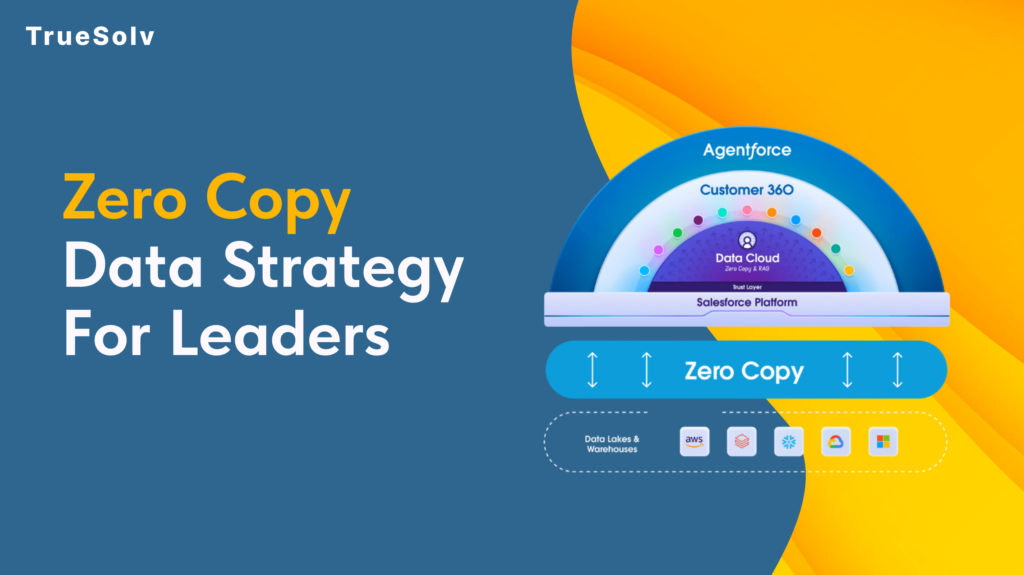
Your data pipeline costs are high because duplication is still the default Moving data feels like progress. Pipelines get built, jobs get scheduled, dashboards get populated. Then the bills arrive and the numbers on those dashboards are still two hours old. Zero Copy is Salesforce’s answer to that pattern. The concept is straightforward: query the data where it lives instead of copying it somewhere else first. The strategic implications for how organisations manage their data estate are considerably less straightforward, and that is what leaders need to understand before committing to a rollout. What Zero Copy changes for cost and speed Traditional data integration between a warehouse like Snowflake or BigQuery and a platform like Salesforce has followed the same basic model for years. Extract data from the source, transform it, load it into the destination, keep the sync job running, fix it when it breaks, reconcile the drift when numbers do not match. Every copy is a maintenance obligation. Zero Copy replaces that model with direct federation. Salesforce Data 360 connects to the external system and sends queries against the data where it already lives. The results come back without a copy of the underlying data ever moving to a new location. When the source data changes, the next query reflects that change immediately. The cost reduction argument operates on two levels. Storage costs drop because duplicate datasets are eliminated. Engineering costs drop because the sync pipelines, the error handling, the reconciliation processes, and the monitoring overhead that comes with them no longer need to exist. For organisations running multiple integration pipelines into Salesforce, that engineering overhead is more significant than the storage bill. On speed, the practical outcome depends heavily on where data physically sits relative to where the query runs. Data 360 uses advanced query pushdown, which delegates computation back to the originating warehouse rather than pulling raw data across and processing it in Salesforce. When the data and the compute are in the same cloud region, this is fast. When they are not, the cross-region transfer introduces the latency that Zero Copy was supposed to eliminate. Use cases that work well Zero Copy performs well in specific scenarios and those scenarios share common characteristics. Operational reporting where freshness matters. If a revenue dashboard, a service queue metric, or an account health score needs to reflect what happened in the last fifteen minutes rather than the last sync cycle, federating from the warehouse eliminates the lag. The data is always current because it is never a copy. Large reference datasets that would be expensive to replicate. Product catalogues, entitlement records, historical transaction data, enrichment datasets from third-party providers. These are large, they change infrequently at the record level, and they are expensive to maintain as copies. Federating them into Data 360 for use in segmentation and identity resolution keeps the warehouse as the source of truth without duplicating the storage cost. AI and agent workloads requiring real-time context. Agentforce and Einstein features fed by stale copied data produce outputs that reflect the past rather than the present. Zero Copy allows AI features to operate against live warehouse data, which meaningfully changes the quality of the output in time-sensitive interactions such as service escalations or dynamic pricing decisions. Bidirectional insight sharing. Zero Copy is not only inbound. Data 360 can share unified customer profiles, segmentation outputs, and AI-generated insights back to the warehouse without replication. Teams that need Salesforce-derived insights in their BI tools or data science environments get those outputs written back to Snowflake or BigQuery without another pipeline layer. Security and access implications Zero Copy changes the security model in ways that require deliberate attention before deployment. With traditional ingestion, access control is applied when data arrives in Salesforce. The ingested dataset can be governed independently of the source. With Zero Copy, access control lives at the source. The permissions set in Snowflake, BigQuery, or the relevant warehouse determine what Salesforce can see. If those permissions are broad, the federation inherits that breadth. The implication for leaders is that permission mapping needs to happen before Zero Copy goes live, not after. Which tables and views is Data 360 authorised to query. Which fields within those tables. Which profiles or roles within Salesforce can access the federated data once it appears in the platform. These questions have answers that sit across two systems, and the governance model needs to account for both. PII handling deserves specific attention. One of the stated benefits of Zero Copy is that personally identifiable information stays in its original governed environment rather than being duplicated into a new location. That is accurate, but it does not reduce the compliance obligation. If GDPR, HIPAA, or any other regulatory framework applies to the data in the warehouse, federating it into Salesforce does not change what those obligations require. Compliance teams should be part of the Zero Copy governance conversation from the beginning. Salesforce provides Private Connect for Data 360, which allows federating from warehouse environments locked within a private cloud network. For organisations with strict network isolation requirements, this is the relevant configuration to understand before assuming Zero Copy requires exposing source systems to the public internet. Implementation checklist and governance Before a Zero Copy rollout, the following decisions should be made explicitly rather than discovered during deployment. Identify the use cases. List the specific reporting, segmentation, or AI scenarios that will use federated data and confirm that Zero Copy fits each one based on the criteria above. Audit the source data. Assess data quality, field naming conventions, and data type handling in the warehouse before connecting it to Data 360. Quality problems in the source appear directly in the federation. Map permissions before connecting. Define exactly which tables, views, and fields Data 360 is authorised to access. Do not default to broad warehouse permissions because the connection is easier to configure that way. Confirm cloud region alignment. Verify that Data 360 infrastructure and the warehouse are in the same cloud region. Cross-region
Salesforce Health Check service for secure CRM

Find security gaps, slow automation, dirty data, and brittle integrations, then fix them with a Salesforce Health Check by TrueSolv.