
You can face a strange issue if you create a formula field in Salesforce and try to use standard ISPICKVAL function with Custom Label because you don’t want to hardcode the values.
For example, the first version of ConnectionStatus__c formula was:
IF (
(ISPICKVAL(Status__c, $Label.Active) || ISPICKVAL(Status__c, $Label.Terminating)) && ISPICKVAL(Suspended__c, $Label.No),
$Label.Connected,
$Label.Disconnected
)
But we got the following error:
Error: Incorrect parameter type for function ‘ISPICKVAL()’. Expected Text Literal, received Text
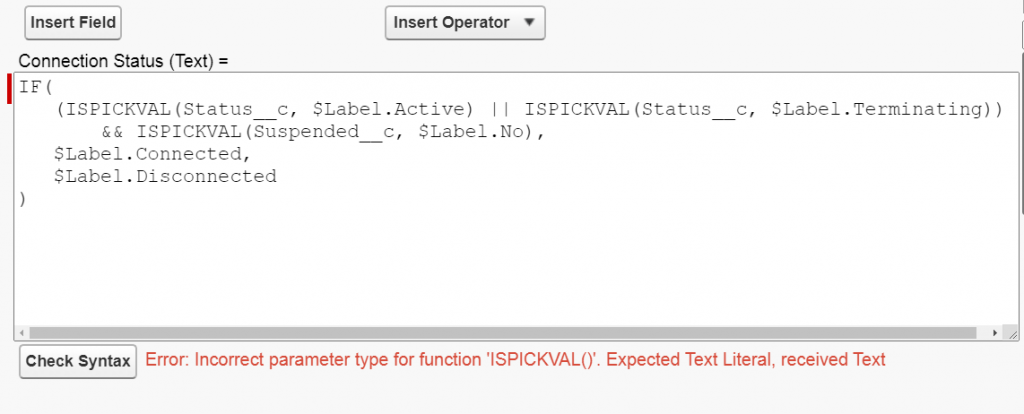
You can be surprised that the ISPICKVAL function can’t work with Custom Label because it is a pretty usual use case. The solution is to use TEXT function.
The final version of the formula is:
IF (
(TEXT(Status__c) == $Label.Active || TEXT(Status__c) == $Label.Terminating) && TEXT(Suspended__c) == $Label.No,
$Label.Connected,
$Label.Disconnected
)
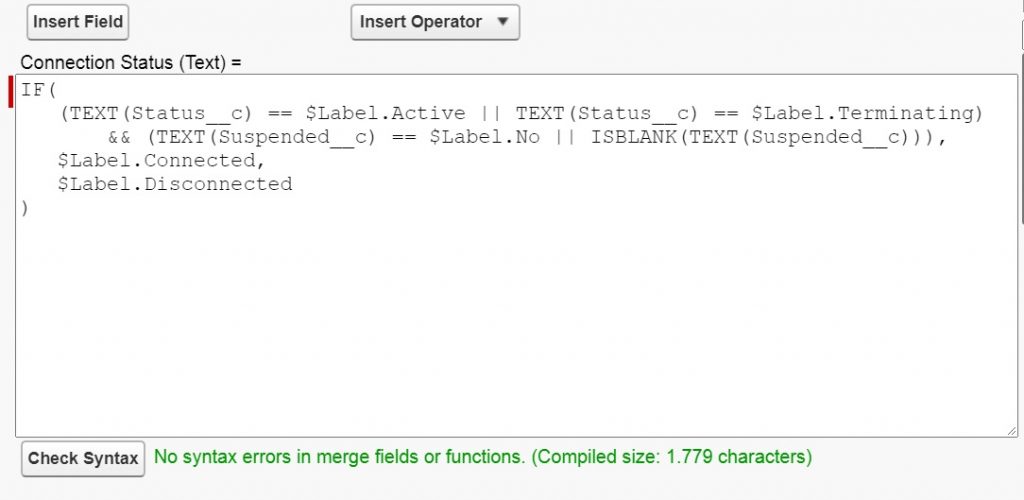
It worked as expected.
If you faced any issue in the Salesforce TrueSolv team can help you. Contact us.