True Archiver: archive Salesforce emails to Google Drive
True Archiver is a Salesforce app that moves emails and their attachments out of Salesforce storage into Google Drive, while keeping every message searchable, viewable and restorable from inside Salesforce. Free up storage without losing your email history.
Why does email history fill Salesforce storage so fast?
Every customer email and attachment saved through Email-to-Case stays in Salesforce file and data storage. Years of history push orgs toward storage limits and extra storage costs, but deleting old emails means losing context your team still needs.
| Capability | Emails kept in Salesforce | True Archiver |
|---|---|---|
| Where emails and attachments live | Salesforce storage | Google Drive |
| Storage usage | Keeps growing | Reduced as you archive |
| Access to old emails | Only while stored in Salesforce | View archived emails from Salesforce |
| Attachments | Count toward storage | Previewed and downloaded from the archive |
| Bringing an email back | — | Restore as an active Email Message |
| Bulk actions | Manual cleanup | Archive or restore selected records at once |
True Archiver features: archive, search and restore Salesforce emails
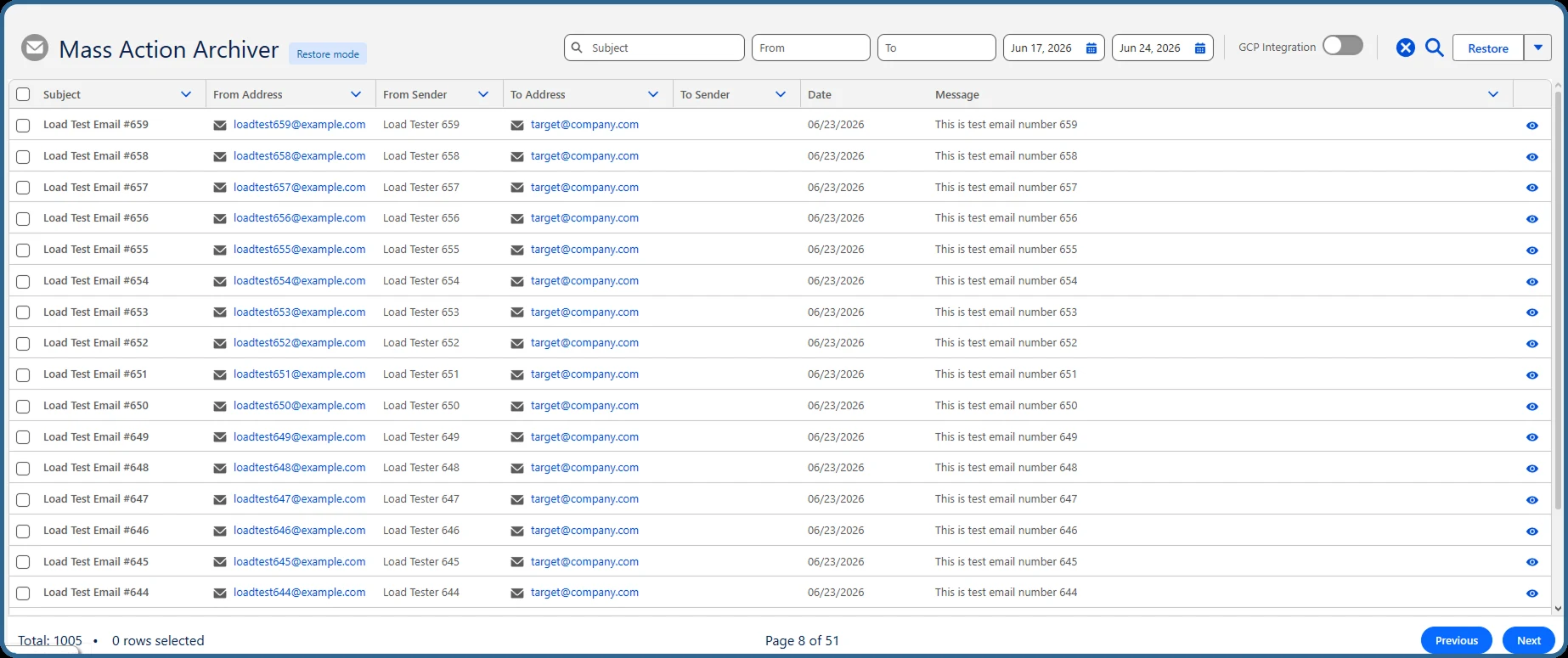
Archive mode
Select Email Message records and move them, with attachments, to the configured Google Drive folder. Processing runs in the background.
Restore mode
Bring previously archived emails back into Salesforce as active Email Message records when you need them again.
Filtering panel
Find emails by subject, from address, to address and date range, then archive or restore the results in bulk.
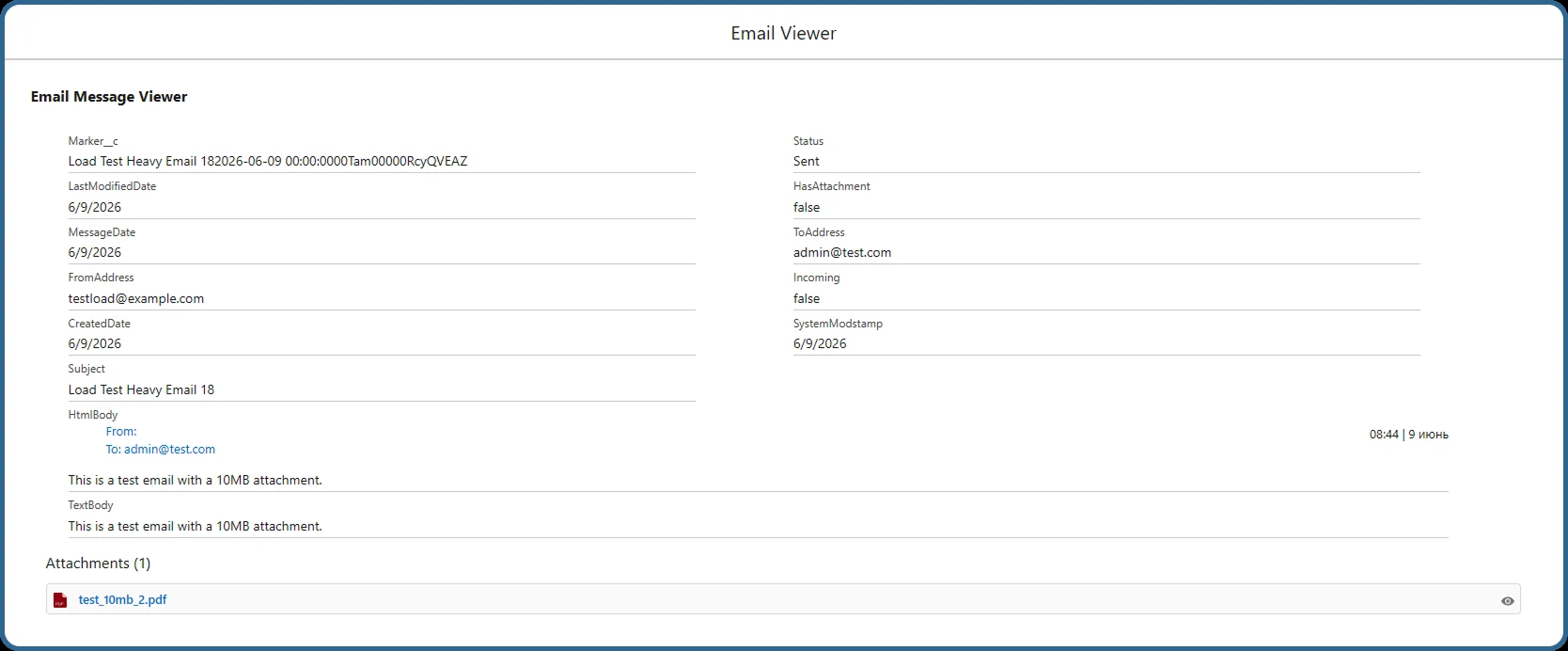
Email Message Viewer
Open an archived email without restoring it: HTML or text body, system timestamps and attachments you can preview and download.
Google Drive storage
Archives go to a Google Drive folder that is created automatically. Set your own folder name or use the default.
Fail-safe by design
A built-in fail-safe mechanism means no data is lost even if the Google Drive integration is temporarily unavailable.
See True Archiver in Salesforce
The Mass Action Archiver and the Email Message Viewer, as your team sees them in Salesforce.
Three situations where teams use True Archiver
Salesforce admins and support operations teams use it when email history is valuable but storage is not unlimited.
Orgs close to their storage limit
Move older emails and heavy attachments out of Salesforce storage to Google Drive instead of buying more storage or deleting history.
Support teams on Email-to-Case
Keep years of case correspondence available for reference, while only recent conversations stay in Salesforce.
Audits and customer disputes
Find an old email by subject, sender or date, open it in the viewer, and restore it to Salesforce if the record is needed again.
How to set up True Archiver
-
Install and enable Email-to-Case
Install the package, then turn on Email-to-Case in Salesforce Setup so incoming emails are saved correctly.
-
Connect Google Drive
A System Administrator creates a Google Cloud project, enables the Google Drive API and connects it through Named Credentials.
-
Assign users and start archiving
Assign the permission set, create the Archiver Configuration, select Email Message and archive your first email.
True Archiver setup guide
A step-by-step guide for your Salesforce admin: Email-to-Case, Google Cloud and Named Credentials setup, permission sets, folder mapping, and how to archive, restore and view emails.
Questions about True Archiver
What is True Archiver?
True Archiver is a Salesforce app by TrueSolv that archives Salesforce emails and their attachments to Google Drive. Archived emails stay searchable and viewable from Salesforce, and you can restore them as active Email Message records at any time.
How does True Archiver reduce Salesforce storage?
It moves Email Message records and their attachments out of Salesforce file and data storage into a Google Drive folder. Storage usage drops as you archive, while archived emails stay viewable from Salesforce and can be restored at any time.
Where are archived emails stored?
In a Google Drive folder connected to your org through Google Cloud and Salesforce Named Credentials. The folder is created automatically when the first email is archived.
Can we still read an email after it is archived?
Yes. The Email Message Viewer shows the HTML or text body, system timestamps and attachments. Attachments can be previewed and downloaded from the viewer.
Can we bring an archived email back into Salesforce?
Yes. Restore mode returns selected archived emails to Salesforce as active Email Message records.
Which records can be archived?
At the moment, True Archiver supports Email Message records and their attachments.
What do we need before installing?
Email-to-Case enabled in Salesforce, a Google account with Google Drive, and a System Administrator to set up the Google Cloud project and Named Credentials once for the org.
Are there any file size limits?
Yes. Do not archive or restore files larger than 10 MB, as this can cause a Salesforce error.
Can True Archiver be customised for our process?
Yes. If you need another object, a different storage provider or a new feature, our team can adapt the app. Book a free call or write to [email protected].
Related Salesforce apps and services
True Field History
Track every field change in Salesforce, with an optional Google Drive archive for older history.
Explore True Field History →Salesforce Health Check
Find out what is filling your storage and what else slows your org down.
Get a Health Check →Salesforce integration
Connect Salesforce to Google Workspace, document storage and other systems.
Integration services →We build Salesforce apps for our own AppExchange listings, and for clients
The team behind True Archiver has 15+ years of Salesforce experience and 150+ delivered projects. If an off-the-shelf app does not fit your process, we can extend this one or build a new one.
- Custom Apex, Lightning Web Components and Flow
- AppExchange packaging and security review
- Integrations with your existing systems
Questions about True Archiver?
Get the setup guide, or book a 30-minute call and our team will help you plan email archiving for your org.